
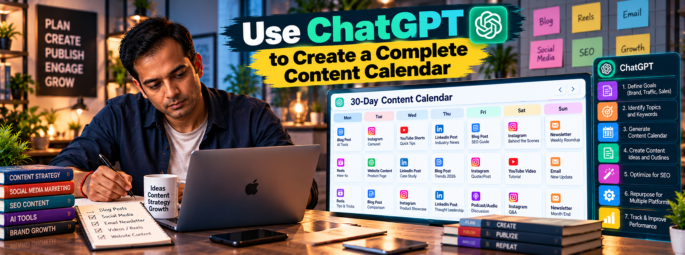
Creating a complete content calendar with ChatGPT requires a structured, multi-step prompting workflow. Requesting a full month of content in a single prompt often leads to generic ideas. Instead, build your calendar iteratively across five procedural phases.
1.Establish Brand Context and Guardrails:Do not ask for post ideas in this step.
Feed ChatGPT your brand profile, audience demographics, target platforms, and publishing cadence. This establishes the knowledge base for all subsequent prompts.
Copy-paste prompt:
Plaintext
Act as a senior content strategist. I want to build a 30-day content calendar, but do not generate ideas yet. First, review and store these brand guidelines:
- Business Type: [E.G., B2B SaaS / LOCAL BAKERY / FITNESS COACH]
- Target Audience: [DEMOGRAPHICS, PAIN POINTS, DESIRED OUTCOME]
- Primary Platforms: [E.G., INSTAGRAM, LINKEDIN, X]
- Posting Cadence: [E.G., 3X PER WEEK ON LINKEDIN, DAILY ON INSTAGRAM]
- Key Goals: [E.G., LEAD GENERATION, BRAND AWARENESS, COMMUNITY BUILDING]

Confirm receipt of this context by stating "Brand context loaded" and list 3 key assumptions about my ideal customer.
2.Define Your Core Content Pillars:
Divide your strategy into 3–5 thematic pillars to ensure balanced content coverage and avoid audience fatigue.
Copy-paste prompt:
Plaintext
Based on our brand context, propose 4 content pillars with recommended distribution percentages (e.g., 40% Education, 20% Social Proof, 20% Promotional, 20% Entertainment/Behind-the-Scenes). For each pillar, write a 1-sentence description and give 2 concrete post examples.
3.Brainstorm Angles and Hooks Across Pillars:
Generate raw concepts organized by pillar before arranging them into dates.
Copy-paste prompt:
Plaintext
Generate 12 distinct content ideas distributed across our 4 pillars (3 ideas per pillar) for [PRIMARY PLATFORM]. Each idea must include:
1. Working Title
2. Primary Hook/Angle
3. Suggested Media Format (e.g., Carousel, Short Video/Reels, Single Image, Text Thread)
4.Format Into a Structured Calendar Matrix:
Convert your approved topic ideas into a structured, chronological timetable. Specify exact output columns for easy export to Notion, Airtable, or Excel.
Copy-paste prompt:
Plaintext
Organize the 12 content ideas into a 4-week content calendar table.
Output as a Markdown table with the following exact columns:
[Week | Day/Date | Platform | Content Pillar | Format | Hook / Headline | Core Takeaway | Call to Action (CTA) | Visual Asset Brief]
5.Batch Draft Captions and Creative Briefs:
Flesh out individual rows into publish-ready copy and creative direction.
Copy-paste prompt:
Plaintext
Write the full post captions for Week 1 of the calendar table above.
Rules for each caption:
- Open with a strong 1-line hook (under 10 words).
- Match our brand tone: [INSERT TONE, E.G., AUTHORITATIVE YET APPROACHABLE].
- Include spacing between paragraphs for readability.
- End with the specified Call to Action (CTA).
- Include 3–5 relevant, non-spammy hashtags.
Example Output: Structured Calendar Matrix
Below is an example of the structured table format produced in Step 4:
| Week | Day | Platform | Content Pillar | Format | Hook / Headline | Core Takeaway | Call to Action (CTA) | Visual Asset Brief |
| W1 | Mon | Education (40%) | Carousel | 5 mistakes costing you 10+ hours a week | Show 5 workflow fixes | Save this post for later | 6-slide Minimalist PDF graphic | |
| W1 | Wed | Social Proof (20%) | Reel / Video | How [Client] doubled leads in 30 days | Case study breakdown | Comment “CASE” for full breakdown | Talking head video with text overlays | |
| W1 | Fri | Behind-the-Scenes | Single Image | The 1 rule our team follows every Friday | Culture spotlight | What’s your team’s Friday rule? | Unfiltered photo of office/team | |
| W2 | Mon | Promotional (20%) | Story Series | We are opening 5 spots for next month | Offer details + link | Tap link to apply | 3-frame Story series with poll widget |
Tips for Exporting and Automating
- Export to Sheets/Excel: Ask ChatGPT to
"Output this table as raw CSV code block"so you can copy and paste directly into Google Sheets or Microsoft Excel. - Integrate with Notion: Ask ChatGPT to
"Format as Notion-compatible Markdown"to import directly into a Notion database table. - Bulk Creation: Process captions week-by-week rather than all 30 days at once to prevent token truncation and maintain copy quality.
